100% Free · Open-source MIT · No ads · No subscriptions

The Last Archiver You'll Ever Need

OpenBox is a cross-platform desktop archiver that compresses and extracts zip · tar · tar.gz · 7z · rar · iso with a clean bilingual UI. Built with Go + Fyne. Forever free, forever ad-free.

6
Archive formats
3
Desktop platforms
0
Ads · Trackers · Paywalls
MIT
License · forever

Why OpenBox?

Tired of "free trial" archivers that nag you for a paid license every seven days? OpenBox was built to be the opposite.

🆓

Genuinely Free

No subscription tiers, no "Pro" upsell, no countdown timers. The binary you download today is the same binary you'll use in five years — paid nothing, nagged never.

🔓

Truly Open Source

MIT-licensed. Source code on GitHub. The license explicitly says you can fork it, modify it, even ship it inside your own product — just keep it free.

🌐

Bilingual UI

Toggle between English and 简体中文 with one click. Your choice is remembered across launches via Fyne preferences — no settings fiddling.

🔒

Path-Traversal Safe

Extraction blocks ../../etc/passwd-style attacks at the engine level. Even archives from untrusted sources can't escape the target folder.

🪟

Native Integration

Windows installer registers file associations and right-click "Compress / Extract with OpenBox" menus. macOS .pkg does the same via Launch Services.

🚫

No Telemetry

No analytics SDK, no "anonymous usage stats", no auto-updater phoning home. What you do with your archives is your business, not ours.

Supported Formats

Six formats covering virtually every archive you'll encounter in the wild. Full read support everywhere; full write support for the open formats.

.zip
Compress Extract
stdlib archive/zip · deflate or store
.tar
Compress Extract
stdlib archive/tar
.tar.gz
Compress Extract
5 compression levels via compress/gzip
.7z
Compress* Extract
*Write via 7-Zip CLI; read pure-Go
.rar
No write Extract
RAR is proprietary — read only
.iso
No write Extract
ISO 9660 image reader

7z compression shells out to the official 7-Zip CLI because the open-source Go ecosystem has no stable 7z writer. Extraction is pure Go and works out of the box.

Take a Look

Three views of the same app: the Compress tab, the Extract tab, and the live progress view with per-file logging.
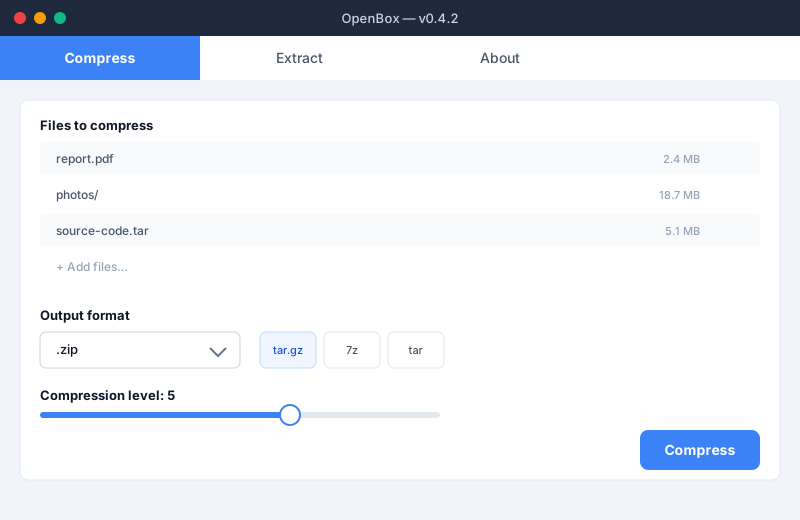
OpenBox Compress tab
Compress tab Drag files in, pick a format, set the compression level, click Compress. Done.
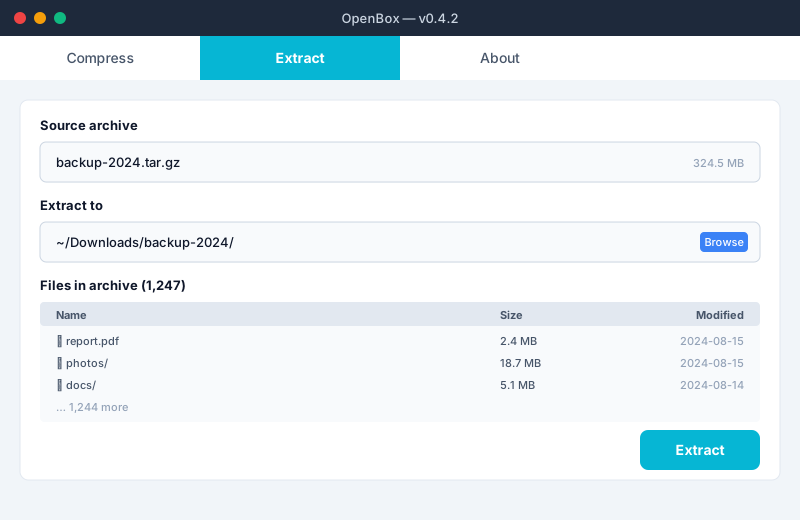
OpenBox Extract tab
Extract tab Browse the contents of an archive before extracting. Pick the destination, click Extract.
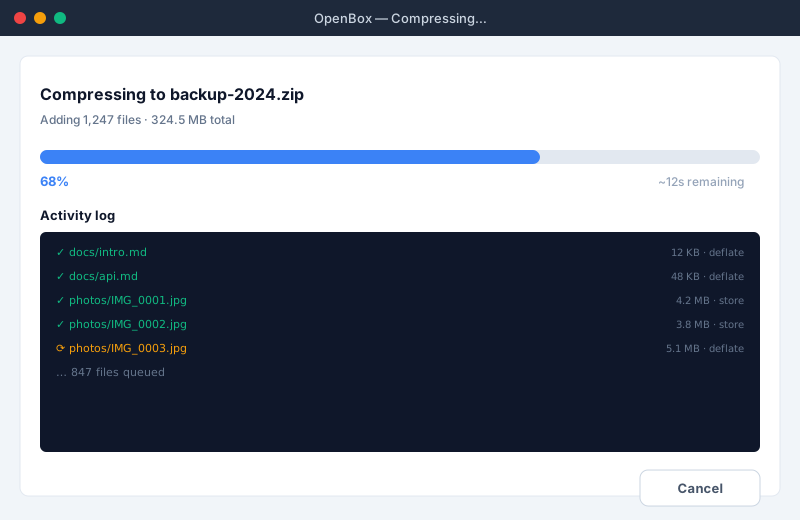
OpenBox progress view
Progress view Big overall bar plus a per-file log with the compression method used for each entry.

Available Everywhere

One codebase, three platforms. Native installers with file associations on Windows and macOS; portable tarball on Linux.

🪟

Windows 10 / 11 x64

Inno Setup installer (.exe) with bilingual wizard, file-type associations for .zip .rar .7z .tar .tgz .tar.gz .iso, and right-click "Compress / Extract with OpenBox" on every file and folder. Portable .zip also available.

🍎

macOS Apple Silicon & Intel

Ad-hoc signed .pkg installer with welcome / readme / license screens. Registers file associations via Launch Services so Finder opens archives in OpenBox on double-click. Portable .tar.gz for both architectures.

🐧

Linux x64

Portable .tar.gz binary. Requires glibc 2.31+ and an OpenGL/EGL runtime (Fyne uses GL for rendering). Works on Ubuntu 22.04+, Debian 12+, Fedora 38+, Arch, and most modern distros.

Ready to ditch the paywall archivers?

Grab the installer for your platform — it's a 30 MB download, takes 10 seconds to install, and never asks you for money again.

↓ Download OpenBox Use it from your AI Agent →